The Killam Learning Commons will be staying open past midnight during final exam prep period—stay tuned for details, we’re still working them out!
Hardware Services Now Open in Learning Commons
I am happy to say that Hardware Services have now moved from the basement into their new location in the South Learning Commons. Hardware Services provide computer and laser printer repairs, parts and peripheral sales, and authorized warranty service to university departments, students, staff and faculty.
Hours of operation will be Monday to Friday, 9:00 am – 12:00 pm and 1:00 pm – 4:30 pm.
I believe the integration of the Help Desk and Hardware Services into the Learning Commons offers a much improved level of service within a single location. That doesn’t mean we’re going to stop there, we are always looking at ways to improve our service levels.
IT Help Desk Now In Learning Commons
The Killam IT Help Desk has now completed its move into the South Learning Commons. The Learning Commons technical assistance team have also moved into the same space to provide a central location for all IT services. The “old’ Technical Assistance desk is still in place, but not staffed, and will eventually be removed. If you require any assistance please come in to our new location, or just pop in to say hello!
The Help Desk will always be open the same time as the Learning Commons, so it will now have slightly extended hours than it did before the move.
The fall and winter hours of operation are normally:
Monday – Friday
8 a.m. – 12 midnight
Saturday and Sunday
10 a.m. – 12 midnight
As exams are approaching the Learning Commons/Help Desk will be opening at 8am on weekends from November 21st until Dec 19th.
Help Desk Moving Into The Learning Commons
A date has been finalized for the Killam Help Desk to move into its new location in the South Learning Commons. On Tuesday November 10th the Help Desk in the basement will close. The Help Desk will reopen in its new location during Friday, November 13th.
During the three days it takes to move into the new location, including Remembrance Day, a temporary Help Desk will be in operation at the Technical Assistance Desk in the South Commons. Due to space and security limitations machines will not be able to be dropped off for repair on Tuesday or Thursday after 4pm, and also all day Wednesday. Please accept our apologies for any inconvenience caused during the move. We’re sure you’ll appreciate the end result!
Book2Net Scanner In The South Commons
 The Book2Net scanner has been moved next to the Technical Assistance desk in the South Commons for the remainder of its trial. If you haven’t tried it yet, you really should! It’s an easy to use machine that allows you to scan images or text and save them as a jpeg on your USB.
If you need assistance ask the Navigator. Don’t forget to leave some feedback, either right here or by filling in a comment card available at the desk. We are very interested in hearing your thoughts and suggestions.
Touchscreen Print Stations Throughout the LC
Following a successful trial of touchscreen technology on one of our Learning Commons print stations, touchscreen print stations have now been installed in all areas of the Killam Learning Commons. To further complement printing in the South Learning Commons, another new HP P4515x laser printer has replaced the last remaining older model.
We hope you like the new print stations and would be interested to hear your thoughts, or any suggestions how they could be improved.
IM Your Question. Get Live Help.
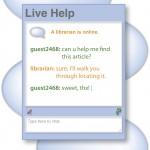 Do you have research questions? Need help finding a book? Looking for a journal article? Get Live Help now!
Live Help is an online reference service that provides quick, at-your-fingertips assistance to students and faculty at universities and colleges across Nova Scotia. Just text your question from your dorm room, office or wherever you are, and a librarian will answer. If there’s no one online in your hour of need, just leave a message (be sure to include your email address), and they’ll get back to you.
The Live Help widget is right on the Libraries’ homepage. Service hours are posted on our Ask Us page. We hope you take full advantage of this great service!
Maple Worksheets Printing
In the Killam Learning Commons we are currently experiencing technical difficulties when printing Maple Worksheets. This issue is being investigated and will be resolved as soon as possible.
Worksheets can still be printed by using the following method:
- Files in worksheet format (.mw) will not print so it is necessary to save a copy in pdf format. On the Maple menu bar click File>Export As…

- Change the file type to PDF and save in the location of your choice.

- Open the PDF file and print.
If you need assistance please ask at the Technical Assistance desk. We apologize for any inconvenience caused and appreciate your patience while we resolve the issue.
Colour Printing Now Available For The Macs
 Users of the iMacs in the South Learning Commons will be pleased to hear that colour printing is now available. Select the printer named KIL_SLC_COLOUR for your colour print jobs. The colour printer is located on the Technical Assistance desk.
iWork09 Installed on LC iMacs
 The latest version of Apple’s productivity suite, iWork ’09, has now been installed on all the iMacs in the South Learning Commons.
- Keynote ’09 – the star of iWork brings a generous dose of Apple flair to presentations and makes PowerPoint look like a Stone Age relic.
- Pages ’09 – updates have made Apple’s word processing application almost perfect.
- Numbers ’09 – many enhancements have improved Apple’s spreadsheet application.
If you just can’t let go of Microsoft remember that Mac Office 2008 is also installed on our iMacs.