We have a new room booking system and a new check-in process for study rooms.
Book a Study Room
Book a study room online using the new booking system. Study rooms are for current Dalhousie students only. You must have a valid Dalhousie NetId and password to access the room booking system. You can:
- book up to 7 days in advance
- reserve a room for up to 2 hours
- manage or cancel your booking online
New! Check-ins for study rooms
Our study rooms are in high demand! To make booking and accessing rooms easier, we’ve introduced a new self-check-in process that confirms your reservation when you arrive.
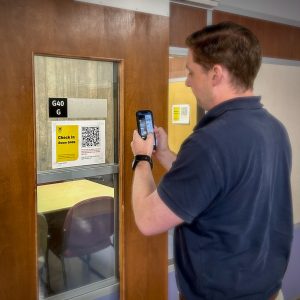 How to check in to your study room
You can check in in either of these ways:
- Use the link in your confirmation email. Open the link and enter the code from your confirmation email when prompted.
- Scan the QR code on your study room. Each study room has its own QR code. Scan the code displayed on the room door and enter your confirmation code when prompted.
You may enter your room early if it is available, but you will still need to complete the check-in process at your scheduled booking time.
Your check-in device must share your location
The device you use to check in must be able to share its location so the system can confirm that you are in the study room you booked.
Neither the booking system nor Dalhousie Libraries stores your location.
If you do not check in within 30 minutes of your booking start time, your booking will be automatically cancelled, and the room will become available for someone else to book.
Leaving early? Check out
If you leave before your booking ends, check out of the room using the same link or QR code you used to check in. Checking out helps us make study rooms available to other students when they are no longer being used.
Need help?
If you have trouble checking in or out, or have questions about your study room booking, visit your library’s service desk.